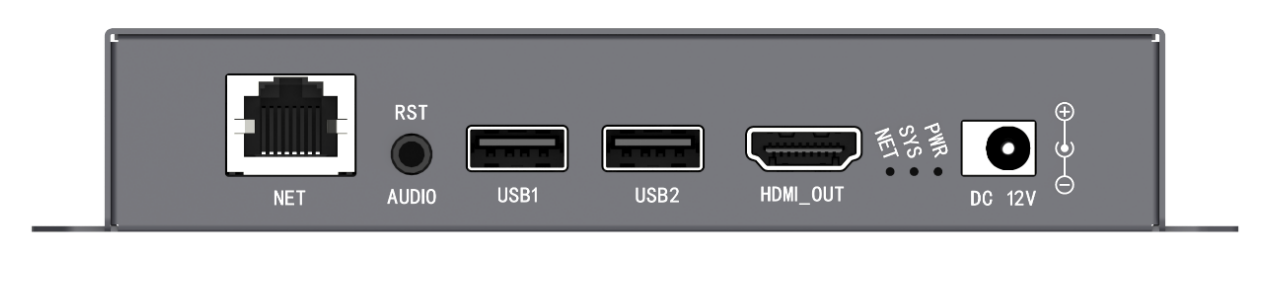
A digital-signage endpoint is a small system, not merely a box attached to a screen. It needs processing for media, storage for scheduled programs, an output matched to the display, a route for updates, and enough monitoring to recover from routine faults. The right digital signage media player hardware is the combination of those layers required by the site, without assuming that every deployment needs the same interfaces.
Processing Begins with the Program, Not the Screen Size
The player must decode the codecs, bitrates, frame rates, and resolutions used in production. A 4K label does not reveal whether the unit can sustain several video windows, animated text, images, and audio at once. The program design should therefore be tested as a workload.
Digital signage media player hardware that plays one 4K clip may behave differently when it must compose multiple elements on a portrait canvas. Orientation and output timing are equally practical. Landscape and portrait rotation must preserve readable geometry, while scrolling text benefits from a stable refresh rate.
If the endpoint is an LED display, pixel load and downstream receiving architecture also become part of the specification. An HDMI-output box and a direct LED-module card solve different connection problems.
Storage and Connectivity Support Different Functions
Local storage keeps the scheduled program available. Network connectivity delivers updates and management commands. That division means digital signage media player hardware should hold enough approved content for the publishing interval, including a fallback program, rather than depending on an uninterrupted network stream.
USB expansion or transfer can help with commissioning, large assets, and sites that are intentionally offline. Storage endurance, available capacity, and update frequency should be considered together. A short loop rewritten several times a day creates a different maintenance profile from a large library updated monthly.
Network bandwidth affects how quickly new files arrive, but local verification determines whether the complete asset was stored correctly before it replaces the approved program. Temporary download space and a rollback copy also need allowance in the capacity calculation. Connectivity should follow the environment.
Ethernet is predictable where cabling exists, Wi-Fi can simplify nearby access, and optional mobile networking can reach distributed sites. None is automatically superior. The relevant questions are bandwidth, signal stability, security policy, update frequency, and who supports the connection after installation.
Output Architecture Determines the Physical Fit
An HDMI player is suitable when the display accepts HDMI directly or a video processor sits downstream. Kystar KP4K-G, for example, supports HDMI 2K/4K output, landscape and portrait rotation, and simultaneous playback of up to three 1080p video windows or five 720p video windows, together with more than ten image windows.
In this form, digital signage media player hardware remains separate from the display’s own control electronics. KPB12 represents another path. It combines playback, sending, and receiving functions, includes 12 HUB-75E ports for direct LED-module connection, provides 8GB of storage with USB expansion, and supports up to five high-definition video streams.
With its 12 HUB-75E ports, direct loading is limited to 200,000 pixels; a compatible Kystar receiving-card chain raises the supported total to 600,000 pixels. The tighter integration can suit compact LED products, provided its load and service boundaries match the design.
Peripheral Control Can Reduce Unattended Risk
Remote displays operate in changing environments. Brightness and temperature sensing, relay control, and watchdog functions can therefore be relevant parts of digital signage media player hardware, especially where no operator observes the screen continuously.
A sensor input does not itself guarantee safe operation; the project still needs thresholds, supported peripherals, and a defined response. Relay-based power control likewise requires an electrical design appropriate to the connected equipment.
The value of these interfaces is that display behavior can reflect site conditions. Brightness can follow ambient light, and a relay can participate in controlled power or cooling workflows. They should be treated as engineered controls rather than optional decorations on a feature list.
Management Software Defines Daily Use
Kares Cloud handles remote publishing, terminal status, screen acquisition, schedules, user authorization, and batch brightness, volume, power, and restart commands. For local administration, Pandora Editor WEB PE can be reached by LAN, direct cable, Wi-Fi, or USB; its editing environment covers pictures, video, text, imported fonts, templates, passwords, and breakpoint resumption.
This software layer determines how the endpoint is administered after the initial installation. Service life adds another filter. Storage endurance, thermal conditions, watchdog behavior, firmware support, and the ability to restore a replacement unit affect long-running deployments.
The player should restart into a defined program after an approved power cycle, retain its schedule, and report enough information for a remote operator to distinguish a network problem from a playback problem. Security controls also need ownership: terminal passwords, publishing roles, and network segmentation must align with the organization’s policy.
These considerations rarely appear in a media-resolution comparison, yet they determine whether a fleet can be maintained consistently after the first campaign has ended. A sound specification starts with the program and endpoint, then adds storage duration, connection policy, physical output, environmental interfaces, and fleet-management duties.
The resulting digital signage media player hardware may be an HDMI box, an LED-integrated player, or another model in the same ecosystem. Kystar offers examples of each role, but the correct configuration is the one whose limits correspond to the deployed screen and its actual operating routine.